Tuesday, August 16, 2016

Tracking our Sobriety Anniversary Using recoveryBox

How To Video Series for recoveryBox iOS App for Addiction Recovery

Below you will find our How To Videos for recoveryBox -Sobriety Anniversaries are an important part of recovery. Don't let the addiction take the celebration out of recovery. Using recoveryBox, track one or more addictions and their anniversary dates. Add a motivating picture to get you through the hard time. See how to set it all up.

Sobriety Anniversaries


Friday, August 12, 2016

Visually search our Lights for Habits in recoveryBox

How To Video Series for recoveryBox iOS App for Addiction Recovery

Below you will find our How To Videos for recoveryBox -visually searching our lights to reveal habits. Sometimes it's just not apparent to us why we act out and sometimes it's so obvious. Perhaps you are the visual type who needs to see what every Friday evening I'm either in the yellow or red zone and it doesn't make sense until you see it for yourself?  Or perhaps you are the type of person who likes to see how many lights you have earned in a day and to see if that number is growing?  Learn how to search using the calendar tool in recoveryBox.

Visually Searching our Lights to Reveal Habits


Monday, August 8, 2016

Customize your Sobriety Date View with a Picture of a Loved One

Personalize your "Sobriety Date" view with a picture of those who mean the most to you. Each time you see this view, be motivated to continue on your journey to freedom from your addiction. 

Your view will change based on the picture selected as well as which device you are viewing it on. 

You can continue to set a "Recovery Goal" on the banner as well as return this view back to the original recoveryBox view by canceling out your picture. 


Want more information about recoveryBox, the iPhone App for Addiction recovery? Visit our site for specifics about how recoveryBox can help you on your recovery journey.

Want to download it now? Visit the recoveryBox page in the Apple Store.

Be Motivated!!

Wednesday, August 3, 2016

CoDependency Recovery App - Breaking Free

recoveryBox - the Addiction Recovery iOS App

recoveryBox was created originally for those in recovery from a pornography or sex addiction.  However, after working with lots of counselors on this concept, we configured recoveryBox so that it would help those who want to break free from the addiction of CoDependency.  

The preconfigured addiction selection for CoDependency has suggestions of the types of habits that need to be broken (called your red lights).  But you can create your own type of addiction that would work better for you by creating your own custom red lights.

By tracking your good habits (green lights) as well as warning situations (yellow lights - people, places, and things) and triggers you can create a clear picture of what habits you have as well as need to break.

Keep accountable with your sponsor or counselor or accountability partner. recoveryBox will let you know it's time to enter your daily lights as well will remind you to connect with your sponsor.

recoveryBox works well with a traditional 12 Step Program or Celebrate Recovery.  Try recoveryBox today. Available for any Apple iDevice.

Don't worry if the lights you see here don't match what you need help with. Customize the addiction to match what you need to track. Users will also want to track their triggers (also customizable) so that accountability partners/sponsors can get a good picture of what's going on.

Want to break the addiction? Accountability does work!

Monday, August 1, 2016

What are recoveryBox "Lights" and how do they help me break my addiction?


Find out what the recoveryBox "Light" system is -- how it works -- recoveryBox.
It's easy to use and does work!  Change those bad habits into good habits!

Download recoveryBox today and be free from your addiction.

Saturday, July 30, 2016

What addictions are supported in recoveryBox the iOS app built for addiction recovery?

Want to know what addictions are part of recoveryBox the iOS app?  here goes (but if you don't find one you like you can create your own by customizing the yellow and red lights)

List of Addictions currently supported in recoveryBox:


~ Adrenaline-Producing Activities
~ Alcohol
~ Anger
~ Being Right
~ Caffeine
~ Cocaine
~ CoDependency
~ Collecting "stuff"
~ Cumpulsive Behavior
~ Drug Abuse
~ Eating Disorder
~ Emotional Addiction
~ Escapism/Amusement
~ Exercise
~ Fantasizing
~ Gambling
~ Getting One's Own Way
~ Heroin
~ Hoarding
~ Idolization
~ Isolation
~ Laziness
~ Lust
~ Marijuana
~ Media (TV, Internet, etc)
~ Methadone
~ Opiates
~ OverWorking
~ People Pleasing
~ Perfectionism
~ Pornography
~ Prescription Drugs
~ Risky Behaviors
~ Sadism
~ Self Injurous
~ Self-Judgement
~ Sex Addiction
~ Shopping
~ Smoking
~ Sniffing
~ Social Media
~ Steroids
~ Substance Abuse
~ Theft
~ Tobacco
~ Travel
~ Trivia
~ Vandalism
~ Vicodin (pain killers)
~ Video Games
~ Voyeurism

YES!  You can even choose more than one from the list for concurrent addictions.

QUESTION: why do some of the Addictions have related addictions?  Well, we thought it best to make the "red" lights specific to the addiction.  For example, you may select just pornography from the list or you may combine it with voyeurism if those combined paint a better picture of what your addiction looks like.

Regardless of which addiction you select, the recoveryBox works the same for all of them..it's built around accountability and replacing those bad habits with new ones (as well as understanding the when/why of what you do!)


Thursday, July 28, 2016

recoveroyBox's Today's Widget and Configure PopUps for Badges Earned

It's exciting to be able to offer new features for recoveryBox - and these ideas come from you the user!

TWO new features..

  1. Todays Widget (and how to configure)
  1. How to turn on/off the live pop ups for badges.


TODAYS Widget

Every wonder.. "Did I enter any lights today?" or "Did I text my accountability/partner or sponsor today?" And ever want to know this right away without starting up the app?

Introducing the Todays Widget for recoveryBox (and it's configurable!!)

When you first add the recoveryBox widget  you will see...

  1.  The lights icon - if you have entered lights it will have a checkmark
  2. The text/email icon - if you have sent an email or text it too will have a checkmark
  3. The arrow icon - will bring you to the app
  4. The blue label will default to a motivational saying.  You can configure this to actually display the addiction label if you prefer.
  5. Default is also a display of the years, months and days of sobriety for each addiction. 
If you tap on any of the icons it will bring you to the app at the correct screen.


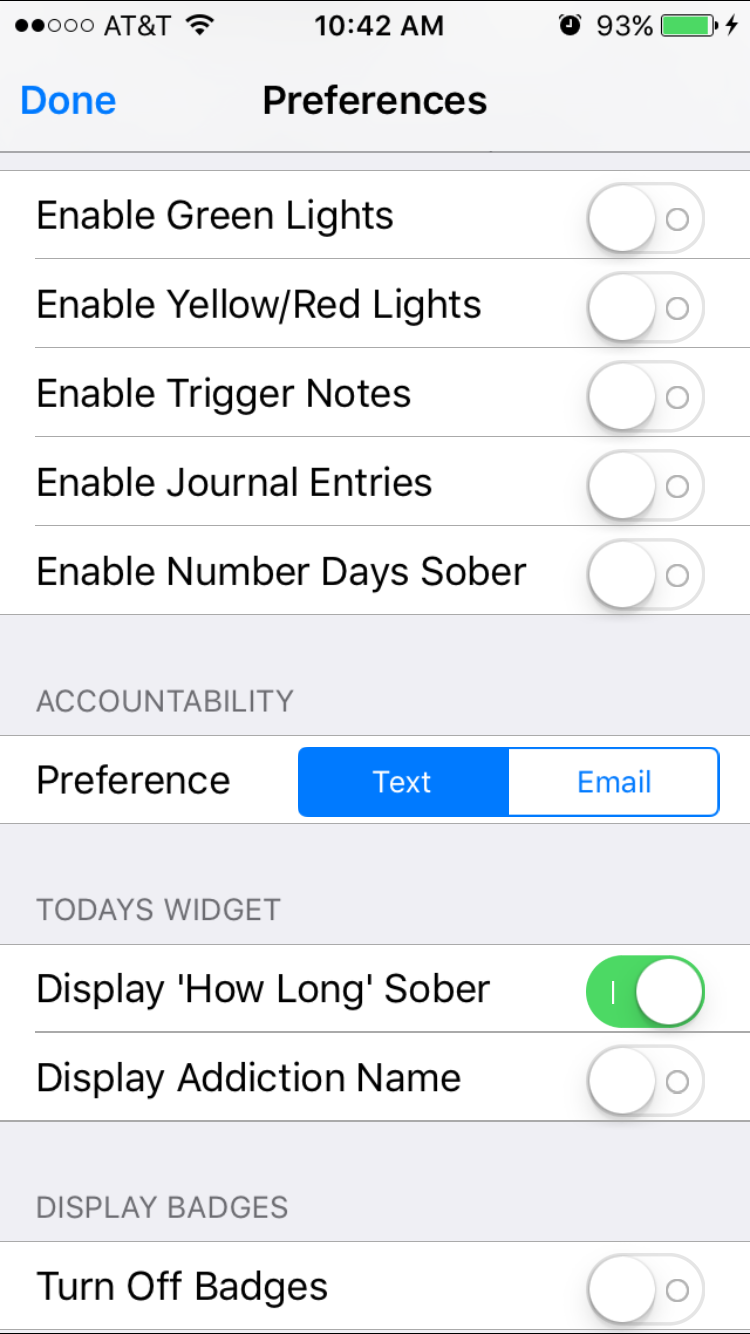
Select the preference tab to configure the Todays Widget


Turning on addiction labels will display the name rather than a motivational phrase.


Don't want to see length of sobriety and only want to see the reminder lights and accountability icons?  No problem.  Just turn it off an only see a motivational phrase.


Badge PopUp Configuration

Well, not everyone likes to have their badges popup in realtime as they earn them -- so you can now configure this too using the preferences for recoveryBox. If you turn off Display Badges they will stop popping up.  Its that simple!....but know that you are still earning your badges behind the scenes and anytime you want to go see what they are just visit the badge screen.

That's it for new features in 5.2!  Remember, if you have an idea let us know so we can see if it makes sense to add it in.  We want to support our users!