
Designed for accountability, recoveryBox is an iOS app toolset that facilitates tracking of daily life activities by easily breaking them down into your "lights". Breaking habits requires knowing why we do what we do, when do we do it and coming up with goals to break unhealthy behaviors. recoveryBox has the tools needed to help with addiction recovery. recoveryBox is designed to work with any addiction: drugs, gambling, pornography, alcohol and more!!
Friday, April 15, 2016
We Found a Bug and are working to squash it!
Yup we know we have a bug when viewing your sobriety date..and we are working to fix it now! Look for an update super soon!

Tuesday, March 29, 2016
Complete Customization for Yellow Lights

COMING SOON
And so we heard your requests and have now added customized Yellow lights.
Yellow lights can be added while customizing red lights for the addiction you create OR you can choose to not create custom yellow lights and use the People, Place, Things pre-defined lights that are available for every pre-defined addiction OR you can use both.
We at recoveryBox want to create the most flexible app so that you will want to use it to be accountable. Recovery is all about accountability and adhering to your plan.
We are planning for this release to be available before the holidays and are in testing stages now. As soon as it's available we will post asap.
Yes, we do listen to your requests and try to implement them. So if you have more ideas, please let us know. And may your recovery journey be one filled with success.
~ Be supported!
To download recoveryBox, visit the Apple Store.
Thursday, February 25, 2016
Building My Personal Lights Comment (activities) List

Adding your lights and customizing activities for yourself is very easy. And once you have added your Green Light Category activities, entry will be a snap which WILL raise your compliance during your addiction recovery treatment.
First, comments for Green Lights (which are the activities that you do daily) are really only there for your own accountability and record keeping. In other words, your accountability partner is going to know how many green lights you are aiming to get a day but doesn't really need to know all of the details. From day to day these are going to change as you start to take care of yourself more and more. So to have them know that you took a shower may not be the most important detail but for you it just might be.
(However, yellow and red lights require comments and can't be selected from a list..so this will only apply to your Green Lights. And your accountability does need to know the why for a yellow or red light.)
To add a comment (an activity) for a Green Light, just click on the Comment(s) field where the Stop Light is. From there you will be brought to a screen where you can either type in your comment OR you can click the Select From Comments Button.

Don't worry, just because you want to select from a list for quick data entry doesn't mean that you can't edit it afterwards. You'll see.
The comment list that you build is based on which Green Light you selected on the initial screen. In this case, we are working with the G1 Physical Self Care. You will only see the associated comments (again think activities) which makes it easier so that you are not searching through a long list.

Now, you may select just one activity if you are the type of user who is entering Green Lights one by one during the day as they occur. OR, if you are the type of person who wants to do all entry of lights at once then you can select more than one from the list.
Don't see what you are looking for?? Want to add another more personal activity?
No problem. Just select Create Personal Comment for Category.

OK, add what you would like. Let's say you want to track that you shower each day. OK. Add that. You only have to add it once and it's in your list forever (or until you decide to delete it! to delete from the list just swipe like all other Apple apps).

OK, select the new activity that you just created and hit done.

Well, since comments are like a personal journal, it would be a shame to have written thoughts and then get them overwritten. The system will prompt your to either Replace your existing comments with the newly selected activities or to Append it to the end of what you already wrote.
For kicks and giggles select Replace.

OK, you have the ability to change what the comments look like here. Remember selecting from the list is just for quick data entry but it needs to be personal to you so feel free to edit if you so desire. Now hit save.

And there they are ready to go. Since I wanted to add all 3 of my G1's at one time I select 3 from the spinner so I get credit for 3 Green G1 lights. If you want to edit your comments before you Generate Lights , just click the Comment(s) field again and it will allow you to edit them as you please.
Not everyone is going to want to document green lights to such a degree but it's there if you want to.
The idea behind this is to have a number of Green Lights that you are shooting for each day and let your accountability partner know that number. When you text/email your Lights they will be able to see how many you had for the day. Change your goal higher and higher as you progress in your treatment and you will start to see how your life style begins to reflect that of someone taking care of yourself. Your habits will change.
Don't have recoveryBox yet and want to the latest mobile app for addiction recovery, then visit the iPhone Apple app store.
For more information about recoveryBox and all the features, then visit recoveryBox's website.Personal Lights Comments (activities) List.
Wednesday, September 30, 2015
New Version 5.1 and A Few Changes

What is new?
Background/Logon Privacy Screen
MANY users asked us to blank out the screen when the app goes into the background mode and also for when it's brought back into the foreground. This visual "hide" was asked for privacy purposes and we felt this was very important. so - added!! You will see the difference both when the app goes into the background mode as well as when the app brings you back to the logon screen (if you use the password feature).
Facebook Integration is Removed
Another change that you will also notice is that all "Facebook shares" directly from the app has been removed. While this might come as a sadness to some, we hope that after this explanation you will understand. As of iOS9, Facebook requires that all apps register with them to get an ID number. There needs to be a call back to Facebook that checks to make sure this app is valid by checking the ID number.
What this now does is make a permanant connection between the App and your Facebook ID. In the PAST you could share directly to Facebook and there was no record of the recoveryBox app - In fact, Facebook didn't even know about the app.
With this new change by Facebook, we felt that is intrusive. We PRIDE ourselves in keeping the data and anything related to recoveryBox completely private. Because we don't control anything on Facebook's side we decided this was best.
recoveryBox and the developers NEVER see your data as it resides only on your device. We have no backend servers where your data resides - and this is completely for privacy reasons.
And so, while this feature was nice to have, you can accomplish the same thing by taking screen shots and then uploading them to Facebook. Sorry about the extra step - but, well, we hope you understand.
Please note..this does not have any affect on Twitter tweets. They do not have the same requirements as Facebook and so we decided to leave that in the app.
iOS9 Ready
Well, let's just say we did this :)
Bug Fixes
- We fixed the bug where users could not edit custom triggers. Opps. Sorry about that.
- Also, added new logo image that was missing for Twitter Tweets
- Reduced memory footprint
Want to kick the addiction, hurt, habit, or hang-up? Download recoveryBox and be accountable.
Thursday, September 24, 2015
Random Resource ThuRsday - Inhalants
Many times when we talk about addictions we immediately think about drugs and alcohol. Thinking about inhaling something is not the first thing that comes to mind but it is one of the most easily accessible of "things" to become addicted to.
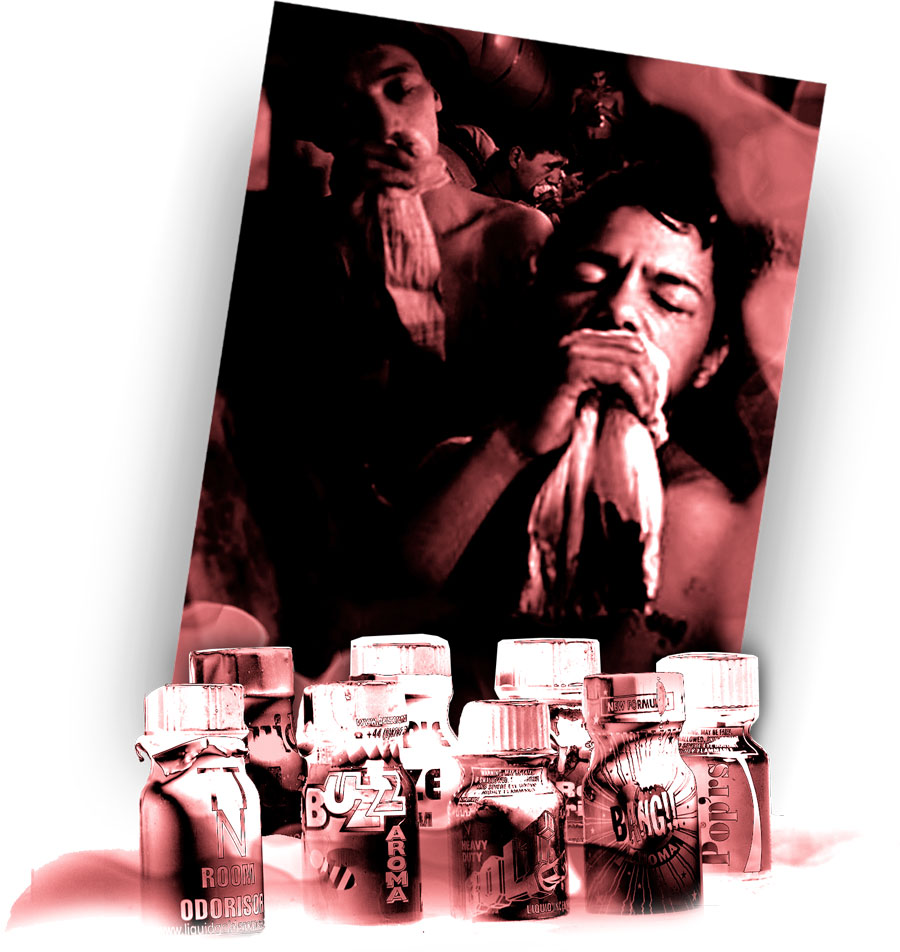 Think about it, what's under your kitchen sink? Or in your garage? Sniffing inhalants is an addiction that starts when kids are young. Yes, kids DO go in the garage and sniff a can of paint. And just one time can cause irreversible brain damage or even death. It's a horrible addiction. Keep reading to become educated on inhalants. Parents when you talk to your kids about drugs and alcohol, don't forget this IS a drug even if it's legal to get.
To find out more visit Drug Free World's Post on Inhalants or visit their entire site. It's filled with loads of information.
Below is the post from Drug Free World. Become Educated!
Friday, May 15, 2015
Celebrate Recovery
Many people think that a traditional 12 Step program is the only option out there for help with recovery from an addiction. And at one point, I too thought that was the case.
But then, a person very close to me told me about Celebrate Recovery. Her description was very much like a 12 Step Program but then something about it really intrigued me. And so I attended my first meeting and very much liked it.

There are lots of churches who offer the Celebrate Recovery program to help with addictions, but also hurts, hang-ups and those bad habits. If you are not comfortable with a traditional 12 step program (and yes those are great and so work too)..check out this other option. www.celebraterecovery.com
What I personally thought that differentiated Celebrate Recovery from a traditional 12 Step program was that at meetings, there is a time of worship, the "higher" power is now God, and that all addictions worship together before breaking apart into groups based on addiction. In fact, that was my favorite part - celebrating everyone's victories together no matter what the habit was as well as hearing so many different testimonies.
If you are curious, recoveryBox, the App featured on this blog works with a sponsor or accountability partner for both a traditional 12 step program or the Celebrate Recovery program.
Get help today with your hurt, hang-up or habit.
But then, a person very close to me told me about Celebrate Recovery. Her description was very much like a 12 Step Program but then something about it really intrigued me. And so I attended my first meeting and very much liked it.

There are lots of churches who offer the Celebrate Recovery program to help with addictions, but also hurts, hang-ups and those bad habits. If you are not comfortable with a traditional 12 step program (and yes those are great and so work too)..check out this other option. www.celebraterecovery.com
What I personally thought that differentiated Celebrate Recovery from a traditional 12 Step program was that at meetings, there is a time of worship, the "higher" power is now God, and that all addictions worship together before breaking apart into groups based on addiction. In fact, that was my favorite part - celebrating everyone's victories together no matter what the habit was as well as hearing so many different testimonies.
If you are curious, recoveryBox, the App featured on this blog works with a sponsor or accountability partner for both a traditional 12 step program or the Celebrate Recovery program.
Get help today with your hurt, hang-up or habit.
Thursday, May 14, 2015
When You Feel the Crave, What Routine Do You Do?
One of the most important parts of being able to deal with an addiction is knowing what our triggers are. Once we figure those out, we can start to reprogram ourselves with "new habits" that we insert into the place of the "old habits" when we sense those triggers or cravings.
For instance, a young girl bites her nails down to nibs and to the point that she can't use her fingers anymore because of the pain. Upon, tracking her data she realizes that she was bored and therefore started biting (and didn't even know it). But as she started to pay attention to the fact that she was bored, she began to figure out her cue and then inserted a new behavior...get up and go get a glass of water.
 Another example, a young successful business man ends up drinking and has created such a bad habit of it that his wife has left him. He doesn't understand why because he provides for her every need. Upon figuring out his triggers, he realized that his anxiety kicks up every time he's about to close a huge business deal. In order to deal with the anxiety he heads to the bar to kick one back and take the edge off. But it has come to the point that anytime he feels anxiety he automatically heads to the bar. Now, he recognizes his anxiety and instead of heading to the bar (old habit) he has inserted a new habit of calling his accountability partner/sponsor that he met at Celebrate Recovery.
We ALL have habits that we wish we didn't have. Some are worse than others and some are downright dangerous. And we can change these habits, but it takes knowledge of what we are doing. By inserting a new habit into the spot of our old habit we can use the same cues as before and still get the same reward. The reward for the alcoholic was not the getting drunk (because no alcoholic says I like the hangover) but rather the temporary release of the anxiety feeling.
With that understanding, you can use recoveryBox to track what your triggers are. Don't confuse the cue verses the trigger. For the alcoholic, the trigger was not "closing the deal" but rather the feeling of anxiety. The cue was waiting for the closing of the business deal. We can't change the cues in life - they exist everywhere. But what does that cue trigger? Realize that feeling and then insert a new habit.
When you text/email your accountability partner, they can clearly see how to relate your triggers with your lights. It will be obvious to link together your triggers with habits. Your habits are being tracked by the light system. An accountability partner can help you see that triggers linked with red/yellow lights mean you are using healthy habits while green lights mean you have replaced bad habits with new ones.
While I know not everyone uses all pieces of recoveryBox (because there are a lot), they really do work together. I encourage you to use the light system in conjunction with the trigger tracking system. Help yourself and your sponsor figure out the puzzle to your behaviors by providing as much information as you can.
As always, if you have questions about how to use the recoveryBox app, please email! Be supported!!
For instance, a young girl bites her nails down to nibs and to the point that she can't use her fingers anymore because of the pain. Upon, tracking her data she realizes that she was bored and therefore started biting (and didn't even know it). But as she started to pay attention to the fact that she was bored, she began to figure out her cue and then inserted a new behavior...get up and go get a glass of water.
We ALL have habits that we wish we didn't have. Some are worse than others and some are downright dangerous. And we can change these habits, but it takes knowledge of what we are doing. By inserting a new habit into the spot of our old habit we can use the same cues as before and still get the same reward. The reward for the alcoholic was not the getting drunk (because no alcoholic says I like the hangover) but rather the temporary release of the anxiety feeling.
With that understanding, you can use recoveryBox to track what your triggers are. Don't confuse the cue verses the trigger. For the alcoholic, the trigger was not "closing the deal" but rather the feeling of anxiety. The cue was waiting for the closing of the business deal. We can't change the cues in life - they exist everywhere. But what does that cue trigger? Realize that feeling and then insert a new habit.
When you text/email your accountability partner, they can clearly see how to relate your triggers with your lights. It will be obvious to link together your triggers with habits. Your habits are being tracked by the light system. An accountability partner can help you see that triggers linked with red/yellow lights mean you are using healthy habits while green lights mean you have replaced bad habits with new ones.
While I know not everyone uses all pieces of recoveryBox (because there are a lot), they really do work together. I encourage you to use the light system in conjunction with the trigger tracking system. Help yourself and your sponsor figure out the puzzle to your behaviors by providing as much information as you can.
As always, if you have questions about how to use the recoveryBox app, please email! Be supported!!
Subscribe to:
Posts (Atom)