Monday, August 1, 2016

What are recoveryBox "Lights" and how do they help me break my addiction?


Find out what the recoveryBox "Light" system is -- how it works -- recoveryBox.
It's easy to use and does work!  Change those bad habits into good habits!

Download recoveryBox today and be free from your addiction.

Saturday, July 30, 2016

What addictions are supported in recoveryBox the iOS app built for addiction recovery?

Want to know what addictions are part of recoveryBox the iOS app?  here goes (but if you don't find one you like you can create your own by customizing the yellow and red lights)

List of Addictions currently supported in recoveryBox:


~ Adrenaline-Producing Activities
~ Alcohol
~ Anger
~ Being Right
~ Caffeine
~ Cocaine
~ CoDependency
~ Collecting "stuff"
~ Cumpulsive Behavior
~ Drug Abuse
~ Eating Disorder
~ Emotional Addiction
~ Escapism/Amusement
~ Exercise
~ Fantasizing
~ Gambling
~ Getting One's Own Way
~ Heroin
~ Hoarding
~ Idolization
~ Isolation
~ Laziness
~ Lust
~ Marijuana
~ Media (TV, Internet, etc)
~ Methadone
~ Opiates
~ OverWorking
~ People Pleasing
~ Perfectionism
~ Pornography
~ Prescription Drugs
~ Risky Behaviors
~ Sadism
~ Self Injurous
~ Self-Judgement
~ Sex Addiction
~ Shopping
~ Smoking
~ Sniffing
~ Social Media
~ Steroids
~ Substance Abuse
~ Theft
~ Tobacco
~ Travel
~ Trivia
~ Vandalism
~ Vicodin (pain killers)
~ Video Games
~ Voyeurism

YES!  You can even choose more than one from the list for concurrent addictions.

QUESTION: why do some of the Addictions have related addictions?  Well, we thought it best to make the "red" lights specific to the addiction.  For example, you may select just pornography from the list or you may combine it with voyeurism if those combined paint a better picture of what your addiction looks like.

Regardless of which addiction you select, the recoveryBox works the same for all of them..it's built around accountability and replacing those bad habits with new ones (as well as understanding the when/why of what you do!)


Thursday, July 28, 2016

recoveroyBox's Today's Widget and Configure PopUps for Badges Earned

It's exciting to be able to offer new features for recoveryBox - and these ideas come from you the user!

TWO new features..

  1. Todays Widget (and how to configure)
  1. How to turn on/off the live pop ups for badges.


TODAYS Widget

Every wonder.. "Did I enter any lights today?" or "Did I text my accountability/partner or sponsor today?" And ever want to know this right away without starting up the app?

Introducing the Todays Widget for recoveryBox (and it's configurable!!)

When you first add the recoveryBox widget  you will see...

  1.  The lights icon - if you have entered lights it will have a checkmark
  2. The text/email icon - if you have sent an email or text it too will have a checkmark
  3. The arrow icon - will bring you to the app
  4. The blue label will default to a motivational saying.  You can configure this to actually display the addiction label if you prefer.
  5. Default is also a display of the years, months and days of sobriety for each addiction. 
If you tap on any of the icons it will bring you to the app at the correct screen.


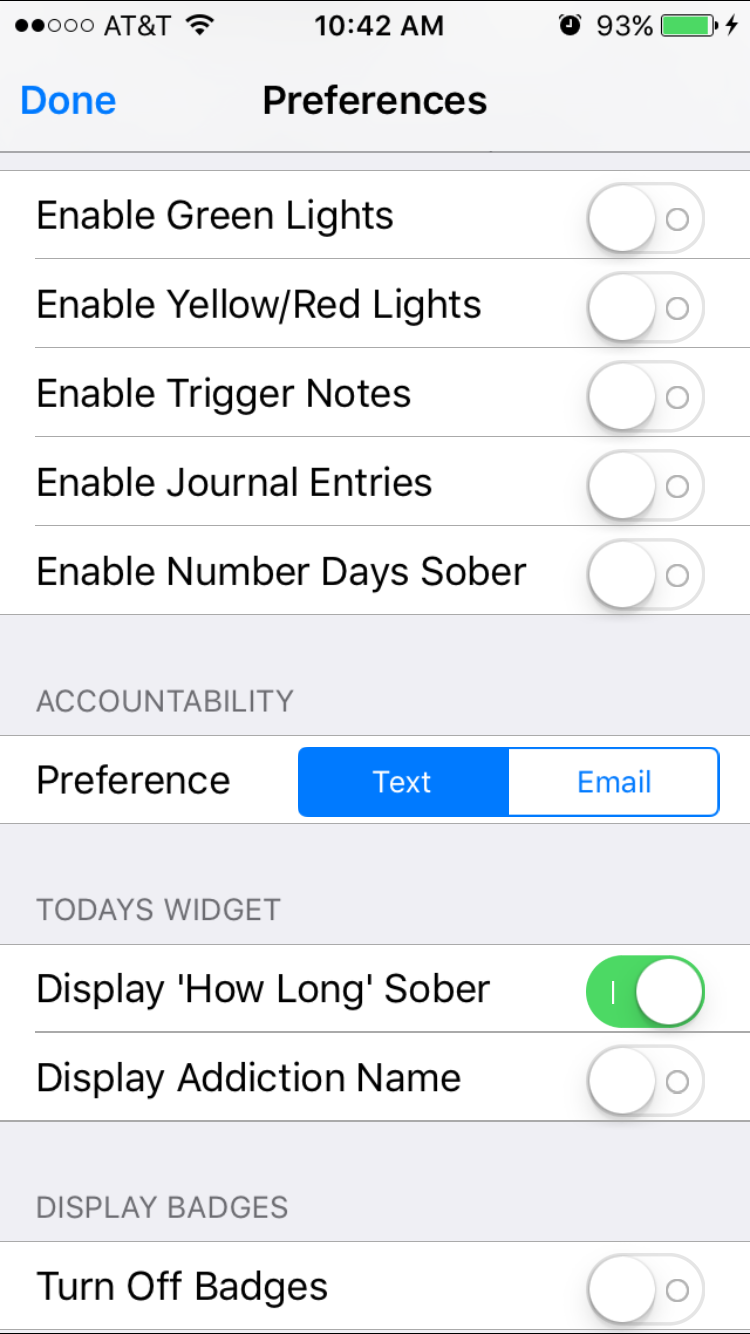
Select the preference tab to configure the Todays Widget


Turning on addiction labels will display the name rather than a motivational phrase.


Don't want to see length of sobriety and only want to see the reminder lights and accountability icons?  No problem.  Just turn it off an only see a motivational phrase.


Badge PopUp Configuration

Well, not everyone likes to have their badges popup in realtime as they earn them -- so you can now configure this too using the preferences for recoveryBox. If you turn off Display Badges they will stop popping up.  Its that simple!....but know that you are still earning your badges behind the scenes and anytime you want to go see what they are just visit the badge screen.

That's it for new features in 5.2!  Remember, if you have an idea let us know so we can see if it makes sense to add it in.  We want to support our users!


Thursday, July 21, 2016

RecoveryBox Named Best Eating Disorder App of 2016

The Best Eating Disorder iPhone and Android Apps
RecoveryBox has made Healthline’s list of the Best Eating Disorder Apps of 2016!  Healthline’s editors carefully selected each winner based on quality, usability and contribution to the community.


From Healthline...

Eating disorders often have deeply rooted psychological ties, and learning to be healthy again can take time, support, and an acceptance that there will be setbacks.
As many as 20 million women and 10 million men in the United States alone suffer from eating disorders such as anorexia and bulimia, according to the National Eating Disorders Association. These disorders don’t only affect how someone feels and looks. Left untreated, they can be deadly.
Recovery can be a long and arduous process, and those coping with an eating disorder can use all the support and help they can get.


Friday, June 3, 2016

Part 3 : One to One Accountability and Your Sponsor

This is where the the entire concept for recoveryBox comes together. You have been diligent about entering your Lights and Triggers and now...

It's time to be honest with someone other than yourself.  And that's why you have a sponsor or accountability partner from a traditional 12 Step Program or from Celebrate Recovery.

When you send a text/email to your accountability partner, it will tally all of the Green, Yellow and Red lights.  You select the time frame (when I write more about the accountability module I'll explain how the dates default).

This is what's so awesome..there is no remembering what the day or week looked like because you already did the work when you entered the lights!!  And believe me it is work being honest to yourself.  

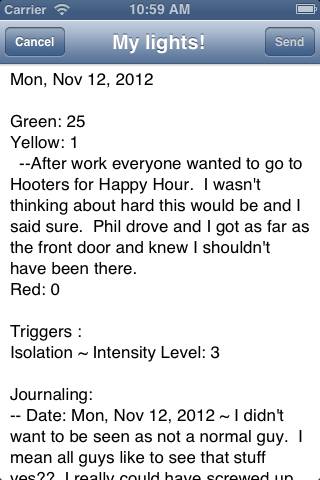
As you can see I use recoveryBox to text (as that's the default I set up) each day by 10:00PM.   It really is that simple and my sponsor can see  as a snapshot what my day looked like.  Let's see an example of what the system builds as a started text/email ( I can edit the piece of communication if I want before I send it too).

As you can see it puts the date (and in my case it's just the one date otherwise it's the range of dates I selected). Then it puts a total of my lights broken down by color...My sponsor and I have made a Green target number I'm supposed to hit and it changes as I meet my goals.

The Yellows and Red's are the hardest for me but it's where I'm being completely honest with myself and another.  Under the settings panel I've enabled comments to be added to my communication piece.  I have nothing to hide from my sponsor but it's nice to have the option (again, when I write more about that module, I'll show you how to enable those).

If I entered any triggers for the day, anything over a green level is included as well as my journaling.  I love being able to communicate to my sponsor without having to retype anything..yet I have it all recorded for me.  Sometimes my sponsor sees something that he is concerned about and will either call or text me back right away..but most times I just get a response saying "OK".  And that's all I need.

This part of recoveryBox is what really allows communication and knowledge to happen between my sponsor and myself.  BUT I do use this with my counselor too.  Sometimes I'm asked how the week was and it's so easy to pull up the information any way I want.  And I'm much more accurate because I can't say "I forgot".

Being successful in Addiction Recovery is about making changes.  With recoveryBox you can actually quantify the changes ~ and that's a good thing!

Use recoveryBox now for your Addiction Recovery.


Thursday, June 2, 2016

Part 2 : One to One Accountability and Triggers

Adding our Lights is great for seeing what we did on a certain day but it's not enough if we are going to figure out the why we do what we do.  I could easily have 26 Green Lights for the day but is it because I was making good choices on a certain day or was it in response to a trigger..say boredom.

Triggers really work well when adding yellow and red lights but we can also gain a lot of information about our addiction if we record our triggers on a daily basis.


recoveryBox tracks triggers much like the light system for daily activities.  At the beginning of the day we start at a 0 Intensity level which is Green.  Then as the day goes on something happens and we start to get frustrated, or bored or depressed and we have different levels which will go into Warning for Yellow and I NEED HELP RED.

Again, visually helping us see as we swipe through our days will make habits/triggers/etc jump out at us!

One day I might feel depressed at a 2 level which is very manageable but the next day that same trigger is at a 8 because I was glossed over by my boss for a promotion.  I may not have acted out and therefore I don't have a Red Light to record BUT I still had those feelings.  And this is where you would record why you had that trigger and didn't act out.  

Many times we will be moving our sliders on days we have acted out but eventually we will learn to not act out and our addiction recovery journey will really take on an entirely new look.

You can journal about the day..and I find it very helpful.  The next segment will show you how to link the accountability for lights and triggers and honestly how it paints a much clearer picture for your accountability partner.  With that information, they can help you with encouragement targeted for what you need.

The Book Icon in the upper right is where you would add your journaling.  If the book icon is empty then you didn't journal but if it's colored orange then you added some meaningful information about your day.

I'll be writing more about this Trigger's Module but for now try adding your triggers daily and see if journaling helps you and your sponsor work together better.  At the very least see if it helps you just feel better getting down your thoughts.  

And yes, I add a Green Light each time I journal or add a trigger.  It means I'm taking care of myself!!


Wednesday, June 1, 2016

Part 1: One-to-One Accountability and Green Lights

This blog post is going to be broken up into 3 different ones.

1.  Adding my Green Lights for Accountability.
2.  Adding Triggers for Accountability
3.  MOST IMPORTANT:: Being Accountable To My Sponsor or Accountability Partner

recoveryBox was built for those who are in recovery for some sort of addiction with some sort of accountability feature.  

When we go through some sort of treatment it's so important that we are honest with ourselves but also someone else..most likely someone who has been there done that.  Usually we choose someone (but not always) who has been there so they understand the pressures we feel and can offer encouragement during those times.

By adding your Lights and Texting/Emailing to a sponsor or accountability partner you are taking ownership of your addiction and telling yourself that you are on the journey to recovery.  It's crucial that we do this!!

Adding G2 One-to-One Accountability Lights are Easy!!


When you Text/Email your Lights to a Sponsor each day that is checking in. That is letting the see a quick snapshot of your day without you have to rehash or even rethink the day. So that's a G2 One-to-One Accountability Green Light I get to add!

I tend to check in with him in the AM with a text to say Good Morning but at night after my day is done I send a text of my Lights.  It's a system we created with the use of recoveryBox during a one on one meeting.  
I'm supposed to send my lights by 10:00 PM.  
It's that easy.  Check in and get credit and Being Accountable all in one easy step.


In the next segments, I'll show how adding triggers completes the picture for accountability and what to do with these lights..in other words using the accountability feature.